 zadao.ai
Bounty Winners In Sandbox
Manual Winner Selection via Stacks Explorer Sandbox
In short
If the platform transaction that pays bounty winners fails, call the contract from the Stacks Explorer Sandbox with the bounty ID, token and winner addresses from the failed accept-submissions transaction.
Overview
This procedure outlines the steps to manually select bounty winners when the automated platform transaction fails on the blockchain. The process uses the Stacks Explorer Sandbox to directly call smart contract functions.
Prerequisites
Before beginning this procedure, ensure you have:
- Access to Stacks Explorer (explorer.hiro.so)
- Administrative access to the bounty smart contract
- The failed transaction details and winner addresses
- STX wallet connected with sufficient gas fees
Step-by-Step Procedure
Step 1: Access Stacks Explorer Sandbox
- Navigate to Stacks Explorer Sandbox
ZADAO-V2-MultiW-Bounty - Log in to your account with administrative privileges
- Ensure your STX wallet is connected and has sufficient balance for transaction fees
Open the contract call in the Stacks Explorer Sandbox
Step 2: Locate Failed Transaction Details
- Navigate to the failed transaction:
- Transaction ID:
0xba6cf…a9cb6
- Transaction ID:
- Extract the following information from the failed
accept-submissionstransaction:bounty_idused_tokenwinners(list of STX addresses)
Step 3: Prepare Winner Addresses
From the failed transaction, the following addresses have been identified as winners:
SP30DPQTSZ1R3XVFJ0Z02CJZ66N8467R04BKMMGZ1
SP3KF338F5A6KNCVBFANM08AKNVNV4ZZKT12HEBXH
SP3BRCBNKKRJTECH2ETCTW5HQ86P1S77MDHCM6VG0
SPK9J5DD22NTTMK6FMF07CANX81FQW8WE63SAM2Q
SP3E1BE5M5SS5SD2Y0T6VWMSX3KJZ09GFCSRHJ144
SP23BQZ3RNTHM7GZZVT2EB5WTRM81JB5N4KJGDKMX
SP258T581PRDFM9M0MHQWTCE9RMD6JQQ74HEWC46P
SP31ZNSNSJK0R8Z8CRVKXFPWPC5A610SEA4XPBTQ7
SP2B9397JT7396J6BJF2DZ6HA6Q298C4938K0S2PB
SP3FTV5B6F5P2B1YHW7SZDDE3VBRJCBZ72420V62M
View the failed transaction in the Stacks Explorer
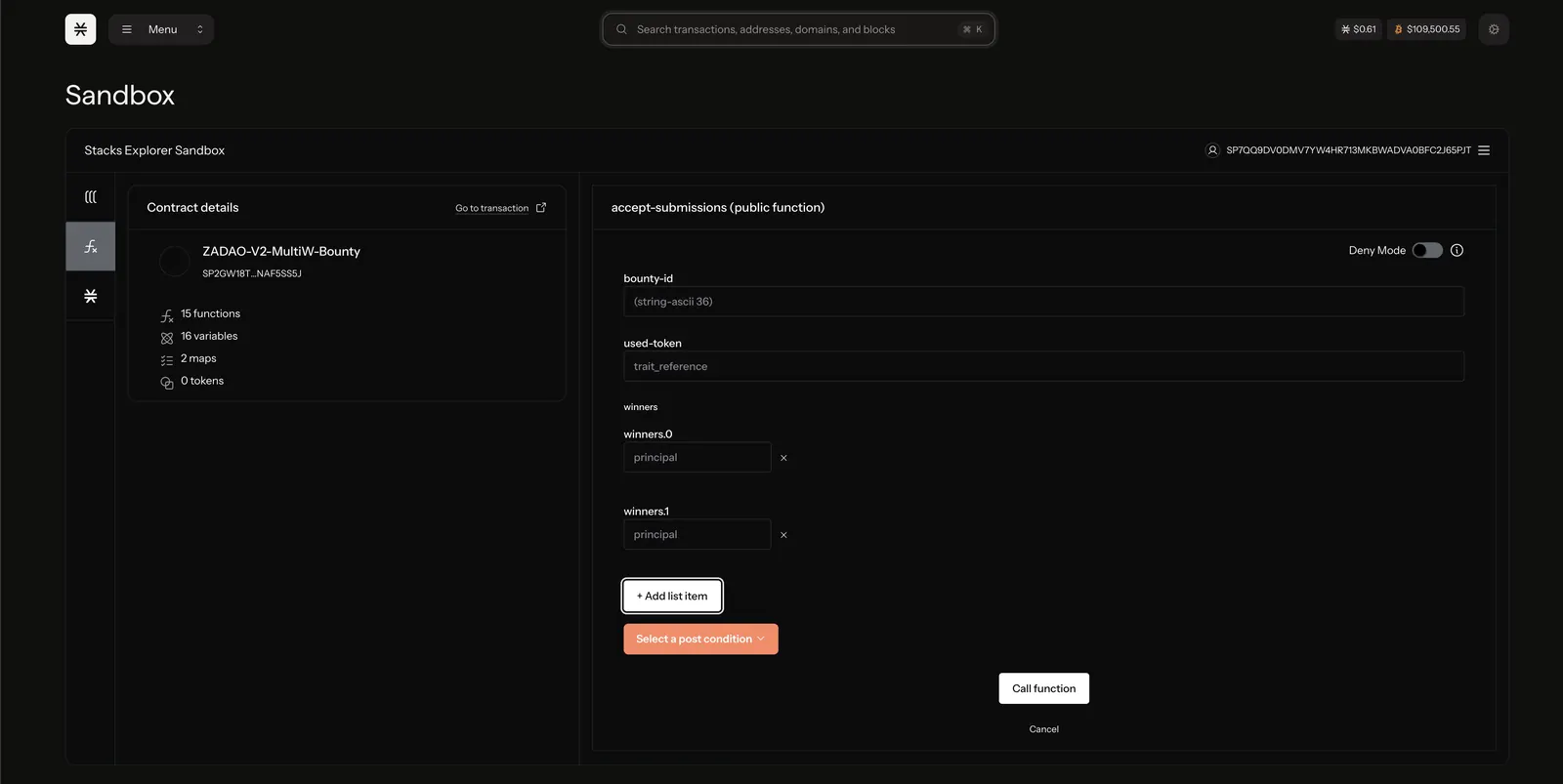
Step 4: Execute Smart Contract Function in the Sandbox
- In the Sandbox interface, locate the bounty smart contract
- Find the winner selection function (likely
select-winnersordistribute-bounty) - Input the required parameters:
- Bounty ID: Enter the
bounty_idfrom the failed transaction - Token: Specify the
used_tokenvalue - Winners: Enter each winner address individually in the provided input fields
- Bounty ID: Enter the
Step 5: Submit Transaction
- Review all entered data for accuracy
- Check gas fee estimation and ensure sufficient STX balance
- Submit the transaction through the sandbox interface
- Wait for confirmation on the blockchain (typically 1-10 minutes)
Step 6: Verification
- Monitor the transaction status in the Stacks Explorer
- Verify successful execution by checking:
- Transaction status shows as "Success"
- Winner addresses received their bounty tokens
- Bounty status updated to "Completed"
- Document the successful transaction hash for record-keeping
Troubleshooting
Common Issues and Solutions
Transaction Fails Again:
- Check gas fee allocation
- Verify all addresses are valid STX addresses
- Ensure bounty contract has sufficient token balance
Input Field Limitations:
- If sandbox limits winner count, submit multiple smaller transactions
- Process winners in batches if necessary
Access Issues:
- Verify administrative privileges on the smart contract
- Ensure wallet connection is stable
Post-Completion Actions
- Notify all winners of successful token distribution
- Update internal records with the new transaction hash
- Archive documentation of the manual intervention
- Review platform code to prevent similar failures in future bounties
- Monitor winner wallets to confirm token receipt
Security Notes
- Always verify addresses before submitting transactions
- Double-check bounty ID and token parameters
- Use testnet for testing if available
- Keep transaction records for audit purposes
- Only authorized personnel should execute these procedures
Screenshot
- To get the bounty_id and token, go back to the
accept-submissionstransaction - Add list item, and add all of the wallet addresses from
accept-submissions - Then call function